Understanding Open Data
On this page:
- What is Open Data?
- Data Licenses
- Uses of Open Data
- For Developers
- Open Data File Types
- Interpreting Data
What is Open Data?
Open data is data that is freely available for anyone to use, re-used and redistributed. The data is provided so people can use it to learn, create new things, or solve problems.
Data Licenses
For a piece of data to be considered it is accompanied with an open data license. An open data license outlines a set of guidelines that spells out can and cannot be done with the data. This is important as:
- Sets clear rules for how the data can be used preventing its misuse.
- Encourages sharing by establishing confidence in the data and the right to redistribute it.
- Ensure that the rights of the data provider and user are respected.
Data Licensing on NiagaraOpenData.ca
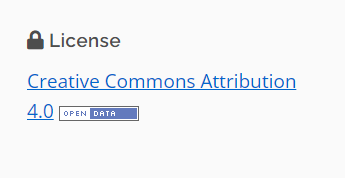
The datasets provided on NiagaraOpenData.ca are licensed by the providing organization. On each dataset page the applied license is noted under the license section. We encourage you to review the terms of the license before using the data, so you are aware of its permitted use.
Uses of open data
The value of open data come from its use. Open data can be used to:
- Learning and Research: Students and researchers can use open data to study and learn about different topics.
- Creating Apps and Tools: Developers use open data to build useful apps and tools.
- Solving Problems: Open data helps solve real-world problems.
- Building Maps: Cartographers use open data to make detailed and accurate maps.
- Promoting Transparency: Governments use open data to share information with the public. This promotes transparency, allowing people to know more about what's happening in their community or country.
- Creating Art and Visualizations: Artists and designers use open data to create stunning visualizations and artworks.
Open data is about turning information into action and making the world more informed and connected.
For Developers
Data
Publishing members on NiagaraOpenData.ca are committed to providing all data on the catalogue in machine readable format. For machine readable datasets, you can simply retrieve the file you need using the file URL.
The Niagara Open Data catalogue is built on the CKAN data management system, which means the catalogue includes several API (Application programming interfaces) that can use when building applications to extract data directly from the catalogue.
Note: All Datastore API requests to the Niagara Open Data Catalogue must be made server-side.
Catalogue API
The catalogue's collection of dataset metadata (and dataset files) is searchable through the CKAN API. The datasets hosted on Niagara Open Data have more than just CKAN's documented search fields. You can also search these custom fields. You can also use the CKAN API to retrieve metadata about a particular dataset and check for updated files.
Read the complete documentation for CKAN's API.
Datastore API
Some of the open data in the Niagara Open Data catalogue is available through the Datastore API. You can also search and access the machine-readable open data that is available in the catalogue.
How to use the API feature:
-
Find your dataset.

-
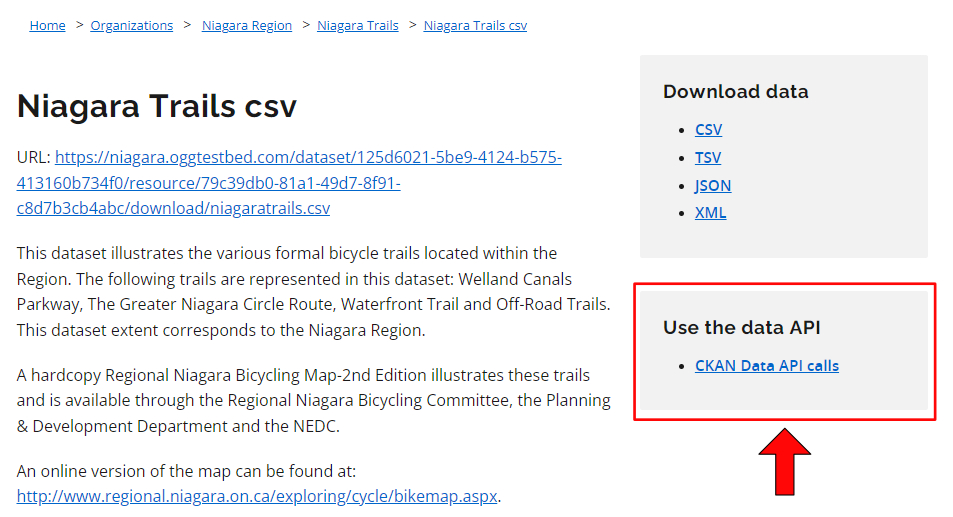
Click Preview to go to the file you want to access through the API.

-
Click the Data API button.
Read the complete documentation for CKAN's Datastore API. (link: https://docs.ckan.org/en/2.9/maintaining/datastore.html)
Connected Remote Dataset
Some organizations have connected their posted datasets to their organization’s existing data catalogues. As the functionality of systems can vary, we encourage you to explore the documentation for the catalogue system used. To assist in locating and access documentation for these catalogue systems we have provided link(s) to the more commonly used system(s):
Open Data File Types
The catalogue provides open data in several file formats (e.g., spreadsheets, geospatial data, etc.). Learn about each format and how you can access and use the data each file contains.
CSV - Comma Separated Values
A file that has a list of items and values separated by commas without formatting (e.g., colours, italics, etc.) or extra visual features. This format provides just the data that you would display in a table. XLSX (Excel) files may be converted to CSV so they can be opened in a text editor.
How to access the data: Open with any spreadsheet software application (e.g., Open Office Calc, Microsoft Excel) or text editor.
Note: This format is considered machine-readable, it can be easily processed and used by a computer. Files that have visual formatting (e.g., bolded headers and colour-coded rows) can be hard for machines to understand, these elements make a file more human-readable and less machine-readable.
Txt – Text file
A file that provides information without formatted text or extra visual features that may not follow a pattern of separated values like a CSV.
How to access the data: Open with any word processor or text editor available on your device (e.g., Microsoft Word, Notepad).
XLS/XLSX – Excel Spreadsheet
A spreadsheet file that may also include charts, graphs, and formatting.
How to access the data: Open with a spreadsheet software application that supports this format (e.g., Open Office Calc, Microsoft Excel). Data can be converted to a CSV for a non-proprietary format of the same data without formatted text or extra visual features.
SHP – Shapefile
A shapefile provides geographic information that can be used to create a map or perform geospatial analysis based on location, points/lines and other data about the shape and features of the area. It includes required files (.shp, .shx, .dbt) and might include corresponding files (e.g., .prj).
How to access the data: Open with a geographic information system (GIS) software program (e.g., QGIS).
Zip – Compressed file
A package of files and folders. The package can contain any number of different file types.
How to access the data: Open with an unzipping software application (e.g., WinZIP, 7Zip).
GeoJSON – Geographic JavaScript Object Notation
A file that provides information related to a geographic area (e.g., phone number, address, average rainfall, number of owl sightings in 2011 etc.) and its geospatial location (i.e., points/lines).
How to access the data: Open using a GIS software application to create a map or do geospatial analysis. It can also be opened with a text editor to view raw information.
Note: This format is machine-readable, and it can be easily processed and used by a computer. Human-readable data (including visual formatting) is easy for users to read and understand.
JSON - JavaScript Object Notation
A text-based format for sharing data in a machine-readable way that can store data with more unconventional structures such as complex lists.
How to access the data: Open with any text editor (e.g., Notepad) or access through a browser.
Note: This format is machine-readable, and it can be easily processed and used by a computer. Human-readable data (including visual formatting) is easy for users to read and understand.
XML - Extensible Markup Language
A text-based format to store and organize data in a machine-readable way that can store data with more unconventional structures (not just data organized in tables).
How to access the data: Open with any text editor (e.g., Notepad).
Note: This format is machine-readable, and it can be easily processed and used by a computer. Human-readable data (including visual formatting) is easy for users to read and understand.
KML- Keyhole Markup Language
A file that provides information related to an area (e.g., phone number, address, average rainfall, number of owl sightings in 2011 etc.) and its geospatial location (i.e., points/lines).
How to access the data: Open with a geospatial software application that supports the KML format (e.g., Google Earth).
Note: This format is machine-readable, and it can be easily processed and used by a computer. Human-readable data (including visual formatting) is easy for users to read and understand.
IVT – Table files
This format contains files with data from tables used for statistical analysis and data visualization of Statistics Canada census data.
How to access the data: Open with the Beyond 20/20 application.
Application/ msaccess – MS Access Database
A database which links and combines data from different files or applications (including HTML, XML, Excel, etc.).
The database file can be converted to a CSV/TXT to make the data machine-readable, but human-readable formatting will be lost.
How to access the data: Open with Microsoft Office Access (a database management system used to develop application software).
PDF - Portable Document Format
A file that keeps the original layout and formatting of a page. The contents of a PDF cannot be edited directly.
How to access the data: Open with web browsers, PDF readers, and word processors.
DOC/DOCX – Word Document
A text file which can include images, tables and many other formatting options.
How to access the data: Open with doc/docx compatible word processors.
RTF – Rich Text Format
A text file which can include basic text formatting and images.
How to access the data: Opens with most word processors (e.g., OpenOffice).
Interpreting data
Open data on the Niagara Open Data catalogue will vary in how it is organized and formatted. Depending on the licence agreement for a dataset, you can choose to organize and format the file to suit your intended use.
Some of the open data on the Niagara Open Data catalogue will have a data dictionary. A data dictionary can help you understand what the dataset means.
If you need further understanding the data, reach out to us using the "Report an error with this data" submission form link located on each dataset page.

What do we tell you about data (metadata)?
Each dataset listed in the catalogue might have the following details as part of its description:
ID (database name: id)
A unique set of numbers and letters.
Example value: 125d6021-5be9-4124-b575-413160b734f0
URL (database name: url)
The URL of the page in the catalogue that lists the dataset.
Example value: https://niagaraopendata.ca/dataset/niagara-trails
Title (database name: title)
A unique title that describes the data.
Example value: Niagara Trails
Name (database name: name)
Same as title, except with dashes ("-") instead of spaces (" ").
Example value: niagara-trails
Description (database name: notes)
A brief introduction that helps users understand the data.
Example value: This dataset illustrates the various formal bicycle trails located within the Region. The following trails are represented in this dataset: Welland Canals Parkway, The Greater Niagara Circle Route, Waterfront Trail and Off-Road Trails. This dataset extent corresponds to the Niagara Region.
Last Validated Date (database name: current_as_of)
The last date someone responsible for the data reviewed the data files and their information to confirm it was still current.
Example value: 20190516T16:06:15+00:00
Date Opened (database name: opened_date)
The date that the data files were first posted to the Open Data Catalogue (and shared with the public).
Example value: 20190516T16:06:15+00:00
Update Frequency (database name: update_frequency)
How often the data maintainers plan to update the data.
Example value: yearly
Date created (database name: metadata_created)
The date that the data is first listed on the open data catalogue.
Example value: 20190516T16:06:15+00:00
Tags (database name: keywords)
Terms that you might use when describing this data.
Example value: bicycle, bike, route, trail
Geographic Coverage (database name: geographic_coverage)
A term describing the geographic boundaries of this data.
Example value: Niagara
Licence (database name: license_id)
An ID that corresponds to the terms and conditions of the licence.
Example value: Open Government Licence 2.0
Creator (database name: creator_user_id)
The ID of the employee who initially listed the data in the catalogue.
Example value: Site Admin
Organization (database name: owner_org)
The organization that is responsible for the data.
Example value: Niagara Open Data
Maintainer (database name: maintainer)
The name of the person or group that can be contacted with questions about the data.
Example value: Site Administrator
Maintainer Email (database name: maintainer_email)
The email address of the person or group that can be contacted with questions about the data.
Example value: [email protected]
Author (database name: author)
The name of the person or group that is the original author of the data.
Example value: Clerks Office
Author Email (database name: author_email)
The email address of the person or group that is the original author of the data.
Example value: [email protected]
Files
Each dataset listed in the catalogue might include multiple related files. Each file might have the following details in its description:
ID (database name: id)
A unique set of numbers and letters.
Example value: 79c39db0-81a1-49d7-8f91-c8d7b3cb4abc
File (database name: url)
The web address where you can find the file on the internet.
Example value: https://niagaraopendata.ca/dataset/125d6021-5be9-4124-b575-413160b734f0/resource/79c39db0-81a1-49d7-8f91-c8d7b3cb4abc/download/niagaratrails.csv
Name (database name: name)
A unique title for the file that helps you quickly understand what it is.
Example value: Niagara Trails csv
Description (database name: description)
A text introduction to the data that helps you understand the file in detail.
Example value: This dataset illustrates the various formal bicycle trails located within the Region. The following trails are represented in this dataset: Welland Canals Parkway, The Greater Niagara Circle Route, Waterfront Trail and Off-Road Trails. This dataset extent corresponds to the Niagara Region.
Version (database name: version)
The number of previous versions of this file that exist.
Example value: 1.8
Data Range Start (database name: data_range_start)
The start-date and time for the data in the file.
Example value: 2019-05-16
Data Range End (database name: data_range_end)
The end-date and time for the data in the file.
Example value: 2019-05-16
Data Birth Date (database name: data_birth_date)
The (estimated) date that the data in this file first started to be collected.
Example value: 2019-05-16
Data made public date (database name: date_publicly_available)
The date the file became available to the public.
Example value: 2019-05-16
Data last updated (database name: data_last_updated)
The date the data within the file was last updated.
Example value: 2019-05-16
Added to Catalogue (database name: created)
The date and time that the file was first listed in the catalogue.
Example value: 20190516T16:06:15+00:00
Type (database name: type)
A label that helps you understand whether a file contains data or just helps you use or understand data.
Example value: data
Format (database name: format)
he extension of the file.
Example value: CSV
Contains geographic markers (database name: contains_geographic_markers)
Whether each row of data has coordinates or another type of mappable information that describes a geographic area.
Example value: FALSE
Size (database name: size)
The amount of space the data file takes up on a computer.
Example value: 1078